SEO Plugin Benefits : RankMath & other Best WordPress SEO Plugins Compared
Affiliate Disclosure : This blog contains affiliate links and I may earn commission if you buy a product or service through these affiliate links without costing anything extra to you. For more info see the FTC Disclosure.
So, in this WordPress blog article we are going to see some of the best SEO Plugins that you will need with your WordPress website or blogs to get Ranked. Plus you will get In Depth info on SEO & other things which are essential if you are thinking about get ranked in Search Engines like Google.
If we talk about usability of SEO plugins then these SEO plugins are one of the most important Plugins you will always need. So read it full.
So, Let’ begin :
What Is SEO? (Search Engine Optimization)
SEO stands for Search Engine Optimization — the practice of optimizing your website content and structure to improve its visibility on search engines like Google, Bing, and others.
Key Elements of SEO:
- On-Page SEO: Optimizing content, headings, images, keywords, meta titles/descriptions.
- Off-Page SEO: Backlinks, domain authority, social sharing.
- Technical SEO: Site speed, mobile-friendliness, XML sitemaps, robots.txt, schema markup.
Why Do You Need SEO?
- Increase Organic Traffic: Better SEO = higher Google rankings = more traffic.
- Improve Visibility & Discoverability: Helps users find your content via relevant searches.
- Build Authority & Trust: Top-ranking sites are seen as more credible.
- Cost-Effective Marketing: Unlike ads, SEO brings long-term results without recurring costs.
- Better User Experience: SEO improvements often enhance site speed and usability.
Here you can find more about SEO & SEM if you are planning to stay longer in the blogging field and if you want to go deep in the basics first.
Plus, here is more about how to get started with your own website. It will be helpful in starting a new Online Journey.
Benefits of Using an SEO Plugin in WordPress
Here are some of the Basic Things SEO Plugins will give to you in Free Versions :
- Optimize meta titles & descriptions
- Analyze content for keywords & readability
- Add schema markup (rich results/snippets)
- Generate XML sitemaps automatically
- Manage redirects (301, 404 monitoring)
- Connect with tools like Google Search Console
- Control indexing (noindex/nofollow settings)
- Improve local SEO
Best WordPress SEO Plugins (2025)
The top 3 SEO plugins for WordPress are:
1. Rank Math
- Known for its feature-rich free version
- Modular approach (you activate only what you need)
- Deep schema & rich snippet support
- Advanced analytics integration
- WooCommerce SEO support
- Lightweight and fast
2. AIOSEO (All in One SEO Pack)
- One of the oldest SEO plugins (very reliable)
- Beginner-friendly setup wizard
- Smart SEO schema markup
- WooCommerce & Local SEO support
- Link assistant & redirection manager
3. SEOPress
- Clean UI with white-label options (ideal for agencies)
- Simple yet powerful interface
- Extensive schema support
- Google Analytics & tag manager integration
- Very developer-friendly (hooks, filters, etc.)
Feature Comparison Table: Rank Math vs AIOSEO vs SEOPress
| Feature | Rank Math | AIOSEO | SEOPress |
|---|---|---|---|
| Free Version Available | Yes | Yes | Yes |
| Schema Markup | Advanced | Good | Good |
| Content Analysis (SEO & Readability) | Yes | Yes | Yes |
| Redirect Manager | Yes (Free) | Pro | Pro |
| WooCommerce SEO | Free | Pro | Pro |
| Local SEO | Free + Pro | Pro | Pro |
| Social Media Integration | Yes | Yes | Yes |
| Sitemap Support | Yes | Yes | Yes |
| Google Analytics Integration | Yes | Yes | Yes |
| Interface Usability | Modern & Clean | Beginner Friendly | Minimal & Clean |
| Performance (Speed Impact) | Lightweight | Moderate | Lightweight |
| Best For | Power users, tech-savvy | Beginners | Agencies, developers |
Pro Features Comparisons of 3 Best WordPress SEO Plugins :
| Feature Category | Rank Math PRO | SEOPress PRO | AIOSEO PRO |
|---|---|---|---|
| Google Integration | GA, AdSense, GSC integrated into WP dashboard | GSC & GA stats in dashboard | Google Search Console integration |
| Rank Tracker | Built-in keyword rank tracker | SEOPress Insights (addon) | Not built-in |
| Content Analytics | Post/page SEO performance reports | Headline analyzer, Google suggestions | Headline analyzer, on-page SEO suggestions |
| Schema Markup / Structured Data | 20+ types, advanced builder, import schema, conditional logic | 17+ types, advanced conditions, custom schema | Basic + pro schemas, limited automation |
| WooCommerce SEO | Advanced product schema, GTIN/MPN, remove product base | Full WooCommerce schema + EDD support | WooCommerce optimization |
| Image SEO | Auto alt text, watermarking, image filtering | AI alt text, automatic metadata | Auto alt tags, file renaming |
| Video SEO | Auto video detection, fetch thumbnails + schema | Video XML sitemap + YouTube support | Video sitemap |
| Local SEO & Knowledge Graph | Multi-location support, Knowledge Panel | Google Local Business schema | Limited (pro tier) |
| Internal Linking Suggestions | Smart link suggestions per post | Yes (in sidebar & metabox) | Link Assistant with link opportunities |
| 404 Monitor + Redirects | 404 monitor, auto-suggestions, redirection | Redirect manager (regex, CSV), 404 alerts | Full redirection manager |
| Automation & Bulk Editing | CSV bulk import, index/nofollow/edit in bulk, instant indexing | CSV import/export of metadata, auto schemas | Full site redirects, domain link cleanup |
| Sitemap Types | Standard, video, news, WooCommerce | Video, news, HTML + custom | Video, news (in pro tiers) |
| RSS Optimization | Not prominent | Custom RSS content | Yes (to prevent scraping) |
| AI Integration (Metadata) | No native AI (yet) | GPT-4 / Turbo for meta + alt generation | Not built-in |
| Editor & Page Builder Compatibility | Elementor, Divi, Avada, WPBakery, etc. | Elementor, all major builders | Works with all builders, SeedProd optimized |
| White Labeling | Only in Business plan | Full white labeling (even in PRO) | No white labeling |
| REST API & Dev Hooks | Some hooks available | Full REST API, hundreds of hooks, WP CLI | REST API metadata support |
| SEO Cleanup Tools | External link control, noindex settings | Broken link checker (SEOPress BOT) | Link cleanup by domain |
| Integrations | Microsoft Clarity, IndexNow, AMP, Semrush | Google Trends, Slack, SEOPress Insights | MonsterInsights, WPForms |
| Pro Support & Updates | 24x7x365 premium support | Priority email support | Priority support |
| Pricing (2025) | $69/year (1 site) | $49/year (unlimited sites) | $49.60/year (1 site) |
Conclusion: Most Basic Use of SEO Plugins & Which One Should You Use?
Which SEO Plugin you should go for :
- Rank Math is ideal if you want maximum features for free, detailed control, and don’t mind a slightly technical interface.
- AIOSEO is great for beginners or bloggers who want an easy setup and proven reliability.
- SEOPress is best for agencies, developers, or anyone who wants white-labeling and performance-first SEO.
Apart from this I would like to give simple use of these SEO Plugins & why you will need one of these in your routine work.
All in all :
All three plugins — Rank Math, AIOSEO, and SEOPress — are reliable, feature-rich, and developer-backed. However, my first choice is Rank Math. It’s highly popular, actively updated, and offers an impressive suite of automated SEO tools, deep integrations, and user-friendly features — making it an excellent long-term solution, especially for beginners who don’t want to switch plugins later.
AIOSEO comes in as a strong contender with a solid track record and a competitive feature set — ideal for those who value a well-supported plugin with a slightly more visual UI.
SEOPress, though slightly less popular, is a powerful underdog — perfect for developers and agencies who want maximum control, white labeling, and affordability across unlimited sites.
- If you’re just starting out, go with Rank Math.
- If you’re experimenting or want to compare UX, try all three — you might prefer the workflow or UI of AIOSEO or SEOPress.
The Very Basic Usage of any SEO Plugin is to Get your Blogs Indexed :
Even the best-written blog won’t show up on Google or Bing unless it’s indexed.
SEO plugins help you:
- Automatically generate a sitemap (a list of all your blog posts/pages)
- Submit that sitemap to Google Search Console and Bing Webmaster Tools
- Ensure your site structure is crawlable and visible to search engines
If a post is not indexed, it will not appear in search results, which means zero visibility — even if it’s great content.
Quick Steps: How to Install Rank Math, AIOSEO, or SEOPress
Common Steps (for All Plugins):
- Login to your WordPress Dashboard
- Go to Plugins > Add New
- In the search bar, type:
- “Rank Math” OR
- “AIOSEO” OR
- “SEOPress”
- Click Install Now
- After installation, click Activate
- Go through their Setup Wizard (usually starts automatically)
How to Install SEO Plugins with Ease in WordPress : Understand with Pictures
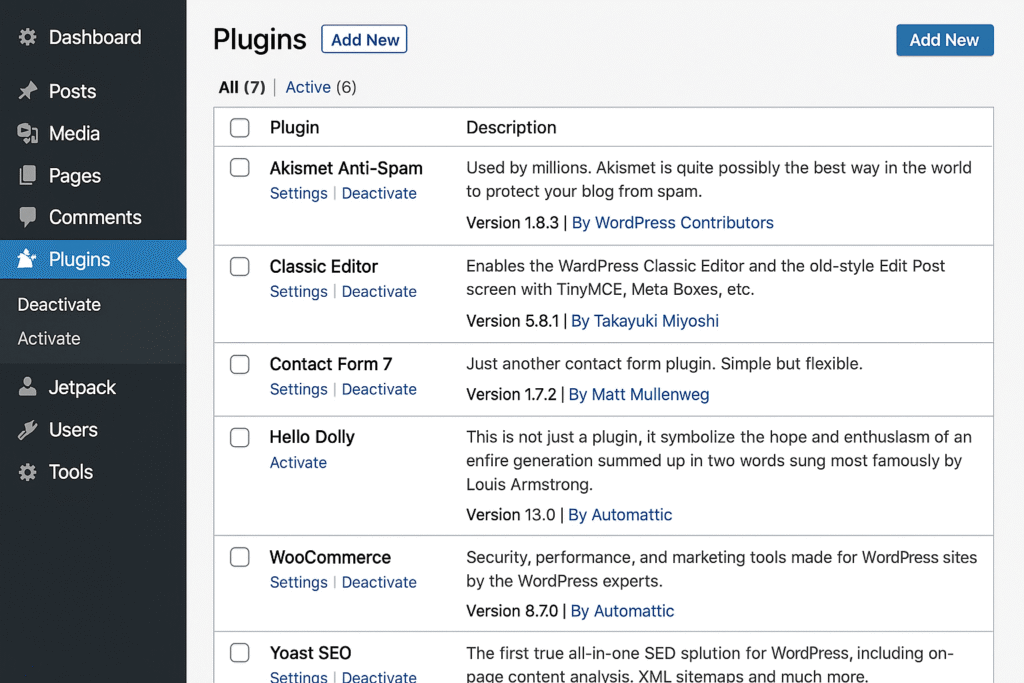
As mentioned earlier – Go to Installed Plugins sections where you can find Add New Plugins button, from where you can find new Plugins to be installed in your WordPress website.
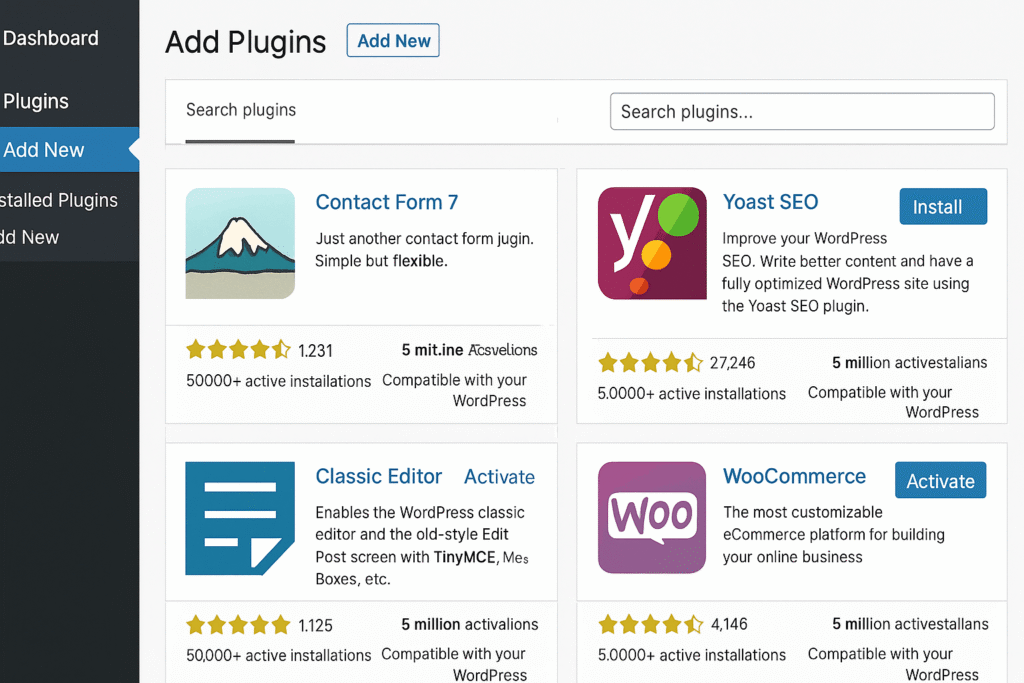
After clicking the Add New Plugins button you can find all new Plugins here as depicted in the above image. Just search for the plugin you like and install & activate the plugins you want to install.
How to Generate & Use Sitemaps with SEO Plugins
Rank Math
- Go to Rank Math > Sitemap Settings
- Enable sitemaps (usually enabled by default)
- Sitemap URL:
https://yourdomain.com/sitemap_index.xml
AIOSEO
- Go to All in One SEO > Sitemaps
- Toggle Enable Sitemap
- Sitemap URL:
https://yourdomain.com/sitemap.xml
SEOPress
- Go to SEO > XML / HTML Sitemap
- Turn on Enable XML Sitemap
- Sitemap URL:
https://yourdomain.com/sitemaps.xml
How to Submit Your Sitemap to Google & Bing
Submit to Google Search Console
- Go to Google Search Console
- Select or add your site (verify it if needed)
- On the left, click “Sitemaps”
- Enter your sitemap URL (e.g.,
sitemap_index.xml) - Click Submit
Submit to Bing Webmaster Tools
- Visit Bing Webmaster Tools
- Add & verify your website
- In the dashboard, go to “Sitemaps”
- Add your sitemap URL and submit
All in all : Basic Usage of SEO Plugins
- Indexing is the most basic yet crucial function of an SEO plugin.
- All major plugins like Rank Math, AIOSEO, and SEOPress provide automatic sitemap generation.
- Use those sitemaps to tell Google/Bing about your content, so your blogs appear in search results.
- Apart from Indexing these SEO Plugins are directly useful in Ranking in Google & Bing like Search Engines, so these SEO plugins are highly recommended & a must use.
- Most of the Features that will get your blogs ranked are available in Free versions of all these SEO Plugins. So use at least any one of these.
Bonus: Google News Sitemaps – For News Publishers
While standard sitemaps help index all types of content, Google News sitemaps are specifically meant for:
- News websites or blogs that publish timely, topical content
- Helping Google News and other news aggregators discover your latest articles within minutes
Are Google News Sitemaps Available in Free SEO Plugins?
- Rank Math, AIOSEO, and SEOPress offer Google News sitemap support, but only in their Pro (paid) versions.
- This is a limitation for budget users or small publishers.
Free Alternative: News Sitemap Generator Plugin
If you want a free solution, you can use this plugin directly from the WordPress repository:
News XML Sitemap Generator – WordPress Plugin
What it does:
- Automatically creates a compliant Google News XML sitemap
- Simple setup, specifically for WordPress news or magazine sites
Who Should Use a News Sitemap?
- News sites, blogs posting daily content, or those targeting Google News visibility
- Highly recommended if you’re applying to or already in Google Publisher Center
Updated Summary for Sitemap Section:
For Google News sitemaps, which are needed for news-based websites, most plugins require a Pro upgrade, but there are free alternatives like the News XML Sitemap Generator plugin on the WordPress.org repository.
All WordPress SEO plugins like Rank Math, AIOSEO, and SEOPress offer standard XML sitemaps for indexing your blog posts — the most basic and essential feature.
So, this is it for Basic use of SEO plugins, How to use these SEO plugins for indexing plus you got all the features compared of 3 best SEO plugins. I hope you like it.
Do Not forget that using any one of these SEO Plugins is a must for Indexing & getting ranked, so do not miss out on it. Free versions are available in WordPress.org repository.
If you are looking for Pro version you can get RankMath PRO version here also.
Final Words : Why RankMath might be the Best Plugin You Would Ever Need
| Feature | Rank Math (Free) | AIOSEO (Free) | SEOPress (Free) |
|---|---|---|---|
| AI Content Suggestions | – (PRO Only) | – | – |
| Schema Generator | ✓ | – Limited | ✓ (some types) |
| SEO Analyzer | ✓ | – | – |
| Redirection Manager | ✓ | – | ✓ |
| 404 Monitor | ✓ | – | ✓ |
| WooCommerce SEO | ✓ | – | – (PRO Only) |
| Keyword Rank Tracker | ✓ (PRO) | – | – (via plugin) |
| Instant Indexing (Bing, etc.) | ✓ | – | ✓ |
| Modular Setup | ✓ | – Partial | ✓ |
Why You Should Stick with Rank Math
- You get more for free than almost any other plugin — including schema, redirections, WooCommerce SEO, image SEO, and more.
- It evolves faster — Rank Math keeps adding new SEO techniques early (AI, GA4 support, instant indexing with IndexNow, etc.)
- Perfect for both beginners and pros — easy UI for starters + advanced options for tech-savvy users.
- Performance-optimized — despite all the features, it doesn’t slow your site.
- All-Round Abilities — avoids installing multiple plugins (schema, redirects, sitemap, etc.).
Rank Math is ahead in both innovation and value. If you care about deep SEO control, growth features like AI and schema, and site speed — it’s the best pick. You were right to say Rank Math gives more SEO features and newer techniques than any other plugin.
You can find RankMath Free version here in this WordPress Plugin repository here.
Happy Blogging
Wonderful post however , I was wondering if you could write
a litte more on this subject? I’d be very grateful iff you could elaborate a little bit further.
Cheers!